01. 잘 되던 login이 안됩니다. (연간 단위 결재)
02. chrome, edge, whale 등의 다른 웹브라우저에서도 안됨
03. 심지어, 브라우저 초기화
04. 무선 AP도 다른 곳으로 접속해보고(테더링까지..)
05. login만 하지 않으면, chatgpt homepage까지는 접속이 가능...
-----------------------
06. openai direct 전화는 힘들고, 홈페이지에서 support@openai.com 를 찾음
07. 다음과 같은 메일 발송
Hello. I have been using ChatGPT well until now.
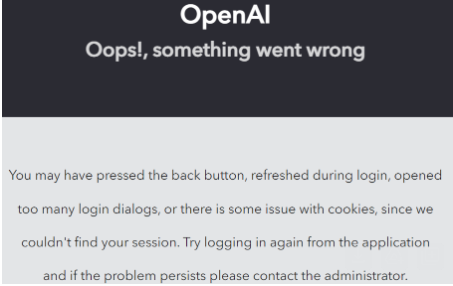
08. openAI에서의 형식적인 답변...
Hi there,
I'm sorry to hear you're experiencing issues logging into ChatGPT. To better assist you, could you please provide more details about the message that appears when you attempt to log in? This information will help us understand the specific issue you're encountering.
In the meantime, here are a few general troubleshooting steps you can try:
- Clear your browser's cache and cookies: Sometimes, outdated cache data can cause login issues. Since reinstalling the browser didn't help, clearing the cache and cookies specifically might resolve the issue.
- Try a different browser or an incognito window: This can help determine if the issue is related to browser settings or extensions.
- Disable VPN or Proxy: If you're using a VPN or proxy, try disabling it. Sometimes, these services can interfere with the login process.
- Check for Outages: Although you didn't mention seeing an outage message, it's always a good idea to check OpenAI's Status Page to ensure there are no ongoing issues affecting the service.
- Ensure you're using the correct login method: If you initially signed up with a specific method (e.g., Google, Microsoft, Apple), make sure you're using the same method to log in.
If none of these steps resolve the issue, and depending on the error message you're seeing, there might be a more specific solution. Please provide the error message you're encountering for more targeted assistance.
Best,
OpenAI Team
09. 그래서, 다시 보냄 (조목조목...설명)

10. 해결 답이 옴
|
Hello,
Thank you for reaching out to OpenAI support. We apologize for the inconvenience and we thank you for reporting this. It's a bug we're aware of and that we're working to fix. In the meantime, if you're using ChatGPT in Google Chrome, there is a workaround. Disable QUIC in Google Chrome. To do this, in the Chrome address bar type: chrome://flags. Scroll down until you see Experimental QUIC protocol and choose Disabled. Alternatively, you can switch to our MacOS app if it is suitable for you. You can download it here: https://openai.com/chatgpt/download/. If you still have any questions or concerns, please don't hesitate to reach out to us - we are here to help. Best, Kurt OpenAI Support |
|
|
11. 그런데.. 10번 과정을 거치지 않아도.. 갑자기 잘 접속이 됨
위의 과정을 처리하지 않아도 잘 됩니다.
위의 문구에 보면, openai 내부 사정이라는데.... 흠..
사용 못한 것에 대한 보상을 해줘야 하는 것 아닌가...~~~
이상입니다.